iScape: Landscape Design App
- 2.9
- Rating
- 500.00K
- Installs
- Free
- Price

 Analysis by App-foxy
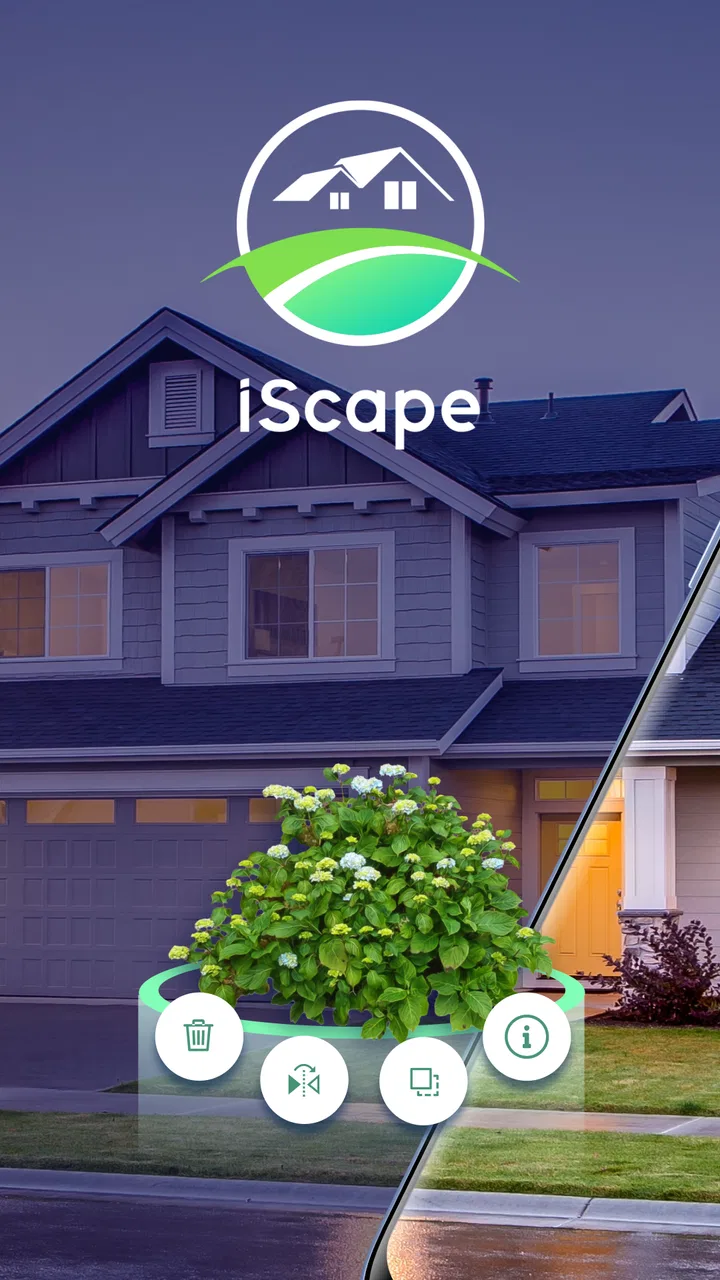
Planning a garden is much easier when you can see an idea before moving soil, buying plants, or asking someone to build it. That is where iScape fits into my routine. It is a lifestyle app from iScape Holdings Inc. focused on visual landscaping, garden design, and outdoor planning. I found it most useful as a shared sketching tool: one person can photograph the yard, another can suggest a different layout, and everyone can discuss the same visual starting point instead of trying to imagine the result from a verbal description.
The app is free to install, carries an Everyone age rating, and is available for devices running Android 8.0 or later. Its current version is 1.4.0, and it has passed the half-million-install mark. Those details make it approachable for casual household use, although the average rating of 2.9 from roughly 1,100 ratings suggests that the experience is not equally smooth for everyone. My impression is that it works best when treated as a planning and communication aid, not as a complete replacement for a landscape professional, a plant nursery visit, or a proper construction plan.
How I used it to plan a shared outdoor project
My favorite way to use the app is with a realistic household scenario: imagine a family or pair of roommates preparing a tired-looking patio area for the warmer months. One person wants a seating space, another wants more greenery, and someone else is worried about leaving enough room to walk between the door, storage area, and garden gate. Instead of debating abstractly, I would take a photo of the existing space and use it as the visual base for several possible arrangements.
You May Also Like

 Blood Strike: 2.5 Anniversary
Blood Strike’s Loadouts Turn Every Drop Into a Tactical Gamble
A close look at Blood Strike’s custom loadouts: how fast access to signature weapons reshapes its battle royale rhythm, rewards preparation, and narrows the gap between fights.

 Pandora - Music & Podcasts
Pandora’s Music Is Easy to Start, but Harder to Recover
Pandora’s strength is its low-effort path from a seed to a station. Its weak spot is how much confidence it asks you to place in connection, setup, and quiet recovery.

 8 Ball Pool
 Is Built on Rivalries, Rematches, and Routine
A close look at the rivalries, rematches, shared routines, and unanswered safety questions that turn a quick pool match into a persistent mobile community.

 Samsung Music
’s Quiet Strength Is Playing What You Already Own
Its reach comes less from spectacle than from dependable access to a personal library. That simplicity is both the app’s strongest retention engine and its ceiling.

 AccuWeather: Weather Radar
AccuWeather Review: A Quick, Clear Forecast for Everyday Decisions
For everyday plans, the best forecast is the one you can understand quickly. AccuWeather makes rain timing, radar, and local conditions easy to act on, with a few trade-offs.

 Hill Climb Racing
Why Hill Climb Racing Still Turns Crashes Into One More Run
A tiny car, a bumpy hill and one more upgrade: Hill Climb Racing keeps resurfacing because its simple chaos makes every near-miss feel personal.
More From Our News Desk



That simple change makes conversations more productive. A chair placed too close to a path becomes obvious. A row of plants that looked modest in someone’s description may dominate the view once it is overlaid on the actual yard. I also found that visual mockups are useful for discussing priorities rather than pretending there is one perfect design. You can compare a version that favors entertaining with one that leaves more open space, then decide which compromise feels right.
The app is especially helpful before a shopping trip. I would create a rough arrangement first, then make a short list of the visual elements that need checking in person. This prevents the common mistake of buying attractive individual items without considering how they work together. The mockup is not a guarantee that every plant, pot, or structure will suit the conditions, but it gives the household a clearer direction.
There is also value in using it with someone who is not physically present. A partner at work, a family member living elsewhere, or a contractor discussing an early concept can respond to an image more easily than to a long message saying that a bench should move “a little to the left.” I would still confirm the final choices on site, but the app reduces the amount of guesswork in the early conversation.
What the visual workflow does well
The strongest part of the experience is the ability to think in layers. Start with the real outdoor area, then consider the major visual pieces one at a time: seating, planting, decorative elements, and the spaces that must remain clear. I recommend beginning with the largest objects rather than decorating immediately. A large planter or seating group controls movement and scale, while smaller details can be adjusted later.
A useful, slightly less obvious technique is to create separate versions for different household goals. One version can prioritize low maintenance, another can emphasize appearance, and a third can preserve the most open floor area. This is more effective than endlessly modifying one image because it keeps the trade-offs visible. If every change replaces the previous idea, it becomes difficult to remember why an earlier arrangement seemed better.
I also like using the app to test visual balance rather than exact construction. For example, a tall feature on one side of a patio may make the opposite side feel empty. Adding a lower group of elements across from it can make the space look more intentional, even if the final selections change. This kind of composition is where the app adds value beyond browsing individual garden products.
At the same time, I would not mistake an attractive overlay for an engineering decision. A visual plan does not settle questions about drainage, ground stability, electrical work, irrigation, local rules, mature plant size, or whether a structure can safely support its intended use. I use the app to decide what deserves closer investigation, not to skip that investigation.
Boundaries when several people use one device
Household use raises a practical question: who is actually making the design? On a shared tablet or phone, the person holding the device can easily become the de facto decision-maker, even when the project belongs to everyone. I found it better to agree on a simple process before opening the app. One person captures the space, each participant explains what they want, and changes are made in a fixed order so the discussion does not become a contest to control the screen.
I would also separate exploration from approval. During the first session, everyone should be free to try unusual arrangements without treating them as commitments. In a later session, the household can review the strongest options and decide which ideas are realistic. That boundary matters because a quick visual experiment can otherwise be mistaken for a final promise about what will be purchased or built.
Because the app is a visual design tool rather than a household project manager, I would keep the practical record somewhere else. A shared note can hold dimensions, shopping decisions, responsibilities, and questions for a professional. The image from the app can illustrate that note, but it should not carry every important detail. This division keeps the creative part enjoyable while preventing forgotten tasks from hiding inside a pretty mockup.
There is another useful boundary for shared devices: avoid assuming that every person wants the same level of access to the project. An adult may be comfortable editing the main concept, while a child may only be invited to suggest colors or plant groupings. The app can support that conversation visually, but the household needs to establish its own rules. I would not rely on the application to define family roles, approvals, or supervision.
Coordinating ideas without creating confusion
Coordination works best when each person has a clear question to answer. Instead of asking, “What do you think?”, I would ask one person to focus on walking space, another on shade and comfort, and another on the overall look. This produces more useful feedback and avoids the vague reactions that often derail a design discussion.
For a shared project, I recommend naming concepts in plain language, such as “more seating,” “open path,” or “plant-heavy.” That makes it easier to compare alternatives later. It also helps when a household returns to the project after a few days and cannot remember what each image was intended to solve. The app supplies the visual conversation, but a little organization from the users makes the conversation far clearer.
One trade-off I noticed is that visual speed can encourage premature agreement. When an arrangement looks polished, people may approve it before checking whether it suits the way they actually live. I would ask practical questions before accepting a design: Can someone carry groceries through this route? Is there room to pull out a chair? Will maintenance require stepping through the planting area? Does the design still work when the space is being used by several people?
This is also where the app compares favorably with the usual alternative of collecting screenshots from general image-search or social platforms. Those sources are good for inspiration, but they usually show someone else’s finished environment. A photo-based design app lets me discuss the household’s own space, which exposes awkward proportions and access problems earlier. On the other hand, a notebook or simple drawing can be faster for rough measurements and written tasks, so I would use both rather than forcing every planning step into the app.
Age, trust, and realistic expectations
The Everyone rating makes the app suitable for a broad household audience, and I can see why children or teenagers might enjoy contributing ideas. They can help choose a mood for the space, suggest a colorful planting area, or compare different arrangements. That participation can turn an outdoor project into a shared activity instead of an adult-only decision.
Still, an age rating is not the same as a complete family-use policy. Adults should decide what device access is appropriate, what project information can be shared, and which suggestions require professional review. I would not ask a child to make decisions about structural safety, chemical use, electrical work, or spending. The app can make the discussion more accessible, but it does not replace adult judgment.
Trust also matters when a project involves a private home. A photograph of a yard may reveal entrances, neighboring property, or other details that the household would prefer to keep private. Before sharing an image outside the family, I would review what appears in the frame and crop or retake it if necessary. That is a general good habit for any photo-based planning tool, and it is particularly important when several people are passing images around.
For older relatives or less technical users, the visual approach can be easier than a specialized desktop design program. They may not want to learn complicated controls just to discuss whether a seating area feels too crowded. I would invite them to react to a few prepared options rather than asking them to build a design from scratch. That keeps the process inclusive without making every participant learn the entire workflow.
Free access and the cost question
The free entry point is a major reason I would suggest trying the app before committing to a larger planning process. A household can explore the basic idea without first paying for a design consultation or buying materials that may not work together. That is particularly useful for renters, first-time gardeners, and people who are still deciding whether a project is worth pursuing.
However, in-app purchases range from $9.99 to $299.99 per item, so I would pay attention before treating the free installation as the complete experience. The broad range indicates that some users may encounter paid options aimed at more serious or extensive planning. I would first identify whether the free tools are enough for a small patio or planting corner, then decide whether an upgrade genuinely solves a problem I have rather than purchasing simply because a more elaborate option appears.
This pricing structure changes who should use the app most cautiously. Someone casually testing a single idea may find the free starting point sufficient. A homeowner planning a substantial outdoor renovation should compare the potential app cost with alternatives such as a local designer, a nursery consultation, or a basic hand-drawn plan. A paid digital tool can be worthwhile when it improves communication, but it should not be judged only by how attractive its images look.
I also recommend keeping the app’s role narrow when budgeting. Use it to compare concepts, then create a separate real-world budget that includes soil preparation, delivery, tools, labor, replacement plants, and ongoing maintenance. A visual design can make a project feel finished long before its practical costs are understood.
Where it fits beside other planning methods
Compared with a blank sheet of paper, iScape is better at showing how an idea relates to the existing appearance of the space. Compared with a general mood board, it is more useful for discussing placement. Compared with professional landscape software, it is more approachable for a household that wants to explore ideas without learning a technical system.
That middle position is both its strength and its limitation. I would choose it for early conversations, visual experiments, and a shared decision about direction. I would choose a more technical solution when accurate dimensions, terrain, irrigation, lighting, materials, or construction documentation become central. I would choose a simple note and camera when the task is only to remember a plant combination or record a shopping idea.
The app is also not the right choice for someone who expects automatic certainty. It cannot make a poor location suitable for a plant, turn an unsafe surface into a safe one, or settle disagreements that are really about budget and lifestyle. Its value comes from making choices visible. The household still has to supply the judgment.
My practical routine for getting better results
I would begin with a clean, well-lit photo taken from a useful standing position, avoiding an angle that exaggerates or hides the available space. Before adding decorative ideas, I would identify the fixed points: doors, steps, fences, storage, existing trees, and the routes people use every day. The first design should solve movement and function before appearance.
Next, I would make only a few meaningful changes at a time. If the image contains too many competing elements, it becomes difficult to tell which decision improved the space. I would save or record the strongest versions, then review them away from the excitement of the first session. A design that looks impressive immediately may feel impractical after considering cleaning, watering, weather, or everyday traffic.
For plant-related ideas, I would treat the visual result as a style guide rather than a planting instruction. Before buying anything, I would check mature size, light, water needs, climate suitability, toxicity concerns, and maintenance. This is one of the most important trade-offs: the app can help a household agree on the look, but real plants have living requirements that an image cannot communicate.
Finally, I would show the preferred concept to the person responsible for the next step. That might be a nursery employee, installer, landlord, or contractor. The image gives them context, while the written list supplies the details. This two-part handoff is more reliable than sending only a screenshot and expecting someone else to infer dimensions or materials.
Who will appreciate it, and who should skip it
I think the app is a good match for homeowners who struggle to imagine outdoor changes, couples who have different design preferences, families planning a shared garden, and renters who want to explore reversible improvements. It is also useful for the early stage of a project when the main question is, “Which direction feels right?” rather than, “How do we build this precisely?”
I would be more hesitant to recommend it to someone who wants a detailed technical plan, a complete maintenance schedule, or a substitute for professional site advice. It may also frustrate users who dislike visual experimentation or who expect every idea to translate directly into a purchasable, correctly scaled result. Those users may be better served by a landscape professional, a specialized design program, or a straightforward written plan.
My household verdict is cautiously positive. The app gives shared outdoor planning a more concrete language, and that can prevent misunderstandings before money and effort are involved. Its free starting point lowers the barrier to experimentation, while the Everyone rating makes it easy to include different generations in the conversation. The main cautions are the uneven user sentiment reflected in its 2.9 average, the possibility of paid options reaching $299.99 per item, and the need to verify every practical decision outside the visual mockup.
I recommend iScape as a conversation starter and design sandbox, not as the final authority on a garden. If you use it with clear household boundaries, keep a separate record for costs and responsibilities, and check real-world planting and construction requirements, it can make an uncertain outdoor project much easier to discuss. If you need precise professional documentation from the first step, I would skip it and choose a more technical route instead.
FAQs for iScape: Landscape Design App
01What is iScape: Landscape Design App used for?
iScape is a landscape planning and visualization app designed to help homeowners, gardeners, and landscaping professionals preview outdoor design ideas. You can photograph or select an outdoor area, add plants, trees, paving, furniture, walls, and other elements, then create a realistic-looking composition. It is useful for exploring concepts before buying materials or starting a project.
02Is iScape suitable for beginners without landscaping experience?
Yes. iScape is designed to be approachable for users who have little or no professional landscaping knowledge. The visual editing tools make it possible to experiment with layouts by placing items directly onto a photo of your yard or garden. However, the app is mainly a planning and visualization tool, so beginners should still verify measurements, plant requirements, drainage, and local construction rules before implementing a design.
03Can I use my own garden photo in iScape?
Yes, one of the app’s most useful features is the ability to work with photographs of your actual outdoor space. After importing or taking a picture, you can overlay landscape elements to see how different ideas might look in context. For the best results, use a clear image taken in good lighting and remember that perspective, scale, and camera angle can affect how accurate the final visualization appears.
04Does iScape include real plants and landscaping materials?
iScape provides a library of landscape-related objects that can be added to a project, including vegetation, hardscaping features, outdoor structures, and decorative items. The exact selection and availability may depend on the app version, platform, or subscription plan. Users should check plant names, mature sizes, climate suitability, and product specifications separately because the visual library is intended for design planning rather than detailed horticultural or construction advice.
05Is iScape free to download, and are there in-app purchases?
The app’s download availability, included tools, and pricing can vary between Android and iOS, as well as between personal and professional offerings. Some features or design assets may require in-app purchases, a subscription, or a separate plan. Before downloading, review the current store listing carefully for supported devices, trial conditions, renewal terms, and any limitations on exporting, saving, or sharing completed landscape designs.
Pros
- Drag-and-drop tools make garden planning simple for beginners.
- Large plant and landscaping image library helps visualize design ideas.
- Photo-based previews make it easier to match plans to your actual yard.
- Useful for comparing multiple layouts before spending on materials.
- Can help communicate renovation ideas to landscapers or contractors.
Cons
- Many premium plants and features require a paid subscription.
- Realistic results depend heavily on taking a clear
- well-framed yard photo.
- Some designs may not reflect local climate or plant-growing conditions.
- Large image libraries and projects can use considerable device storage.
- Advanced users may find the editing and measurement tools too limited.

iScape: Landscape Design App
Gallery